You
Login to the Ledgerline sandbox fails with 401. Find out why, fix it, open a PR. I'm off to bed.
Custosworking name
For developers who let a coding agent work with real keys
Your agent uses your keys by name. Custos adds them on the way out. You approve in an app built for your phone, and the grant ends when you said.
Proof of concept Strongest in service mode → iPhone/Android run pending
Your agentnames a key, never holds it
handle
Custos daemonon the agent's machine: adds the key, scrubs the answer
value injected
The APIgets the key over HTTPS
sealed requestsigned grant
Our relaycarries both, sealed: can't read them
sealed requestsigned grant
Your phonea passkey signs yes, until a time you pick
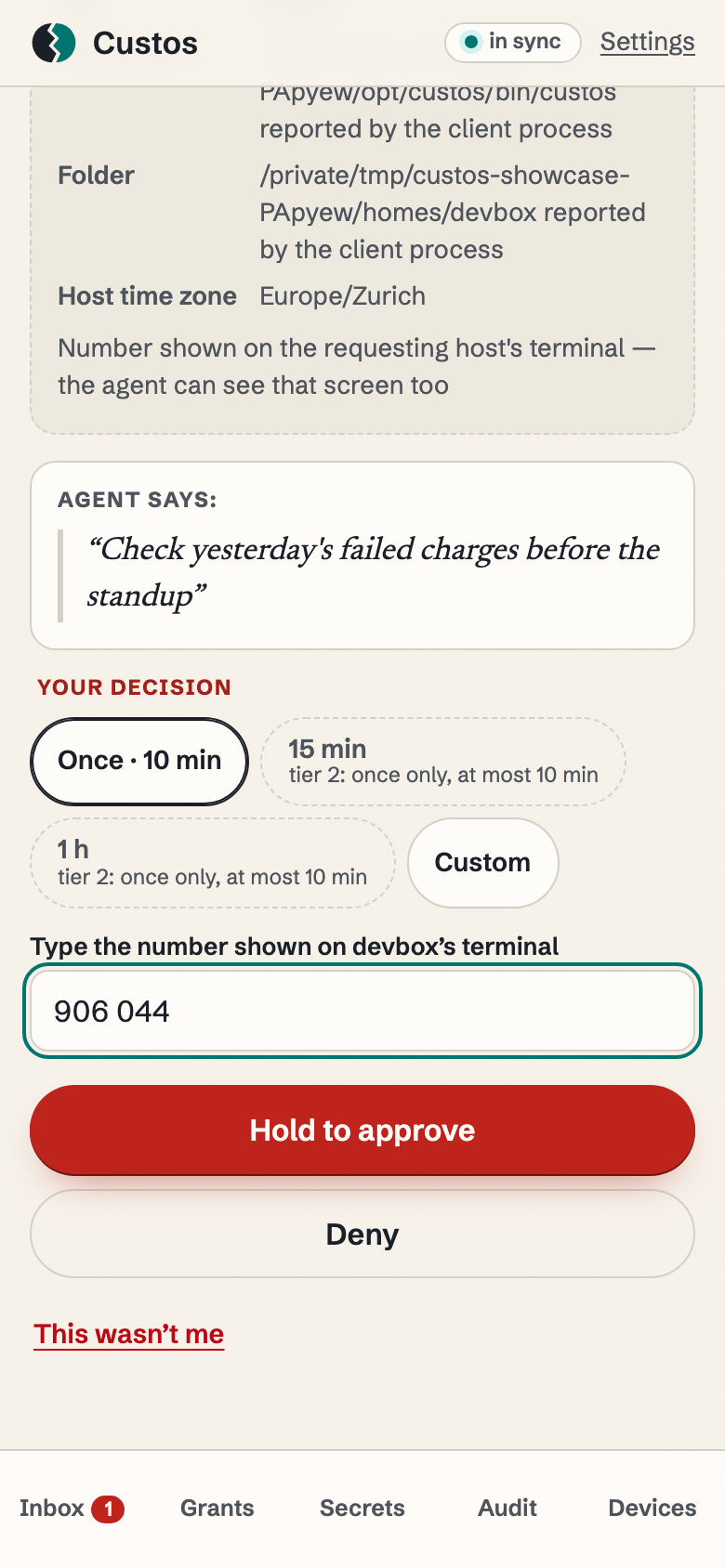
Real CLI · real approver app · one recorded run hero run 23 Oct, 09:33 CEST · every screen cropped, the whole one tap away
dev@laptop:~/work$ custos request staging-api --until 07:00 --uses 200 --reason 'Overnight migration run: backfill the orders table'
Request TL__yqH1cU-vvwvLNd_VIg  fingerprint: nectar bamboo shadow
Type this number on your phone: 089 592
request TL__yqH1cU-vvwvLNd_VIg
granted until 2026-10-24 07:00 CEST, 200 uses
[exit 0]
[22:01 laptop] bedtime: one approval
dev@laptop:~/work$ custos request staging-api --until 07:00 --uses 200 --reason 'Overnight migration run: backfill the orders table'
Request TL__yqH1cU-vvwvLNd_VIg  fingerprint: nectar bamboo shadow
Type this number on your phone: 089 592
request TL__yqH1cU-vvwvLNd_VIg
granted until 2026-10-24 07:00 CEST, 200 uses
[exit 0]
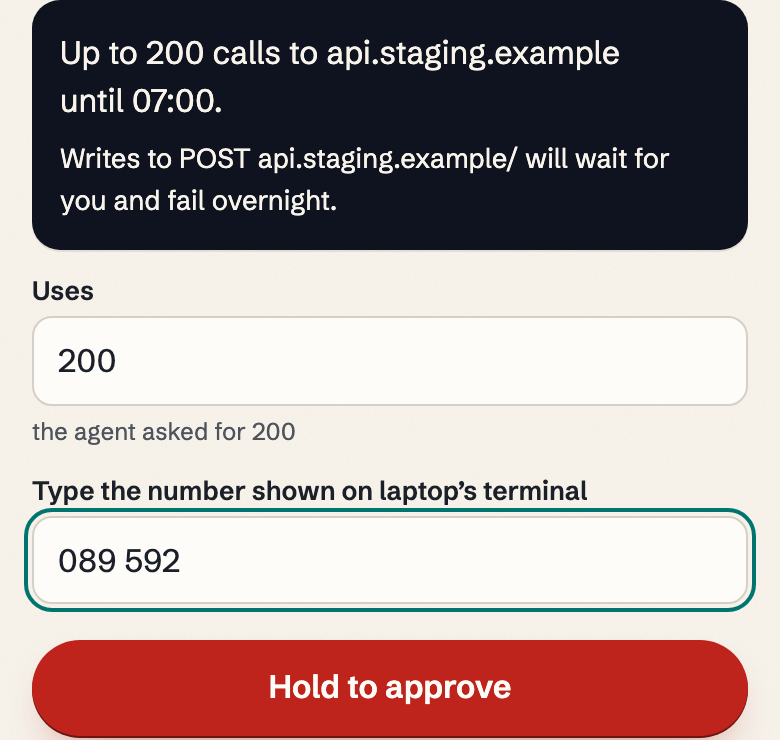
089 592 on the terminal = 089 592 typed on the phone
[03:12 laptop] inside the lease: no question asked
dev@laptop:~/work$ custos http staging-api GET https://api.staging.example/migrations/3 --reason 'check migration 3'
HTTP 200 · 5 redaction(s)
⋯ 1 line left out: 308-character JSON echo of the request; the key in it reads «custos:staging-api»
[exit 0]
[07:01 laptop] after 07:00: it waits for you
dev@laptop:~/work$ custos http staging-api GET https://api.staging.example/migrations/4 --reason 'check migration 4' --wait 0
Request BmyfGXpA8En_52q2VCv2_A  fingerprint: dune ember kayak
custos: needs_approval: needs approval: approve the request on your phone (request BmyfGXpA8En_52q2VCv2_A, fingerprint: dune ember kayak)
[exit 3]
⋯ cropped: [22:01 laptop] custos handles, its 2 output lines and [exit 0]
[22:01 laptop]one approval at bedtime
dev@laptop:~/work$ custos request staging-api --until 07:00 --uses 200 --reason 'Overnight migration run: backfill the orders table'
Request TL__yqH1cU-vvwvLNd_VIg  fingerprint: nectar bamboo shadow
Type this number on your phone: 089 592
request TL__yqH1cU-vvwvLNd_VIg
granted until 2026-10-24 07:00 CEST, 200 uses
[exit 0]
[22:01 laptop]
dev@laptop:~/work$ custos http staging-api GET https://api.staging.example/migrations/1 --reason 'check migration 1'
HTTP 200 · 5 redaction(s)
{"body_b64":"","headers":[{"base64":"aWRlbnRpdHk=","hex":"6964656e74697479","name":"Accept-Encoding","value":"identity"},{"base64":"QmVhcmVyIH«custos:staging-api»","hex":"42656172657220«custos:staging-api»","name":"Authorization","value":"Bearer «custos:staging-api»"}],"method":"GET","path":"/migrations/1"}the key, replaced in raw, base64 and hex
[exit 0]
⋯ cropped: [22:01 laptop] custos http staging-api GET https://api.staging.example/migrations/2, its 2 output lines and [exit 0]
[03:12 laptop]inside the lease: reads go through; a write waits for you by rule
dev@laptop:~/work$ custos http staging-api GET https://api.staging.example/migrations/3 --reason 'check migration 3'
HTTP 200 · 5 redaction(s)
⋯ cropped: 308-character JSON echo of the request, as above
[exit 0]
[03:12 laptop]
dev@laptop:~/work$ custos http staging-api POST https://api.staging.example/deploys -d '{}' --reason 'deploy the migrated schema' --wait 0
Request MXClipIMCuZ5LqdJjQUR2A  fingerprint: beach moss lobster
custos: needs_approval: needs approval: approve the request on your phone (request MXClipIMCuZ5LqdJjQUR2A, fingerprint: beach moss lobster)
[exit 3]
[07:01 laptop]after 07:00: nothing without a new approval
dev@laptop:~/work$ custos http staging-api GET https://api.staging.example/migrations/4 --reason 'check migration 4' --wait 0
Request BmyfGXpA8En_52q2VCv2_A  fingerprint: dune ember kayak
custos: needs_approval: needs approval: approve the request on your phone (request BmyfGXpA8En_52q2VCv2_A, fingerprint: dune ember kayak)
[exit 3]
⋯ cropped: [07:01 laptop] custos status, its 27 output lines and [exit 0]
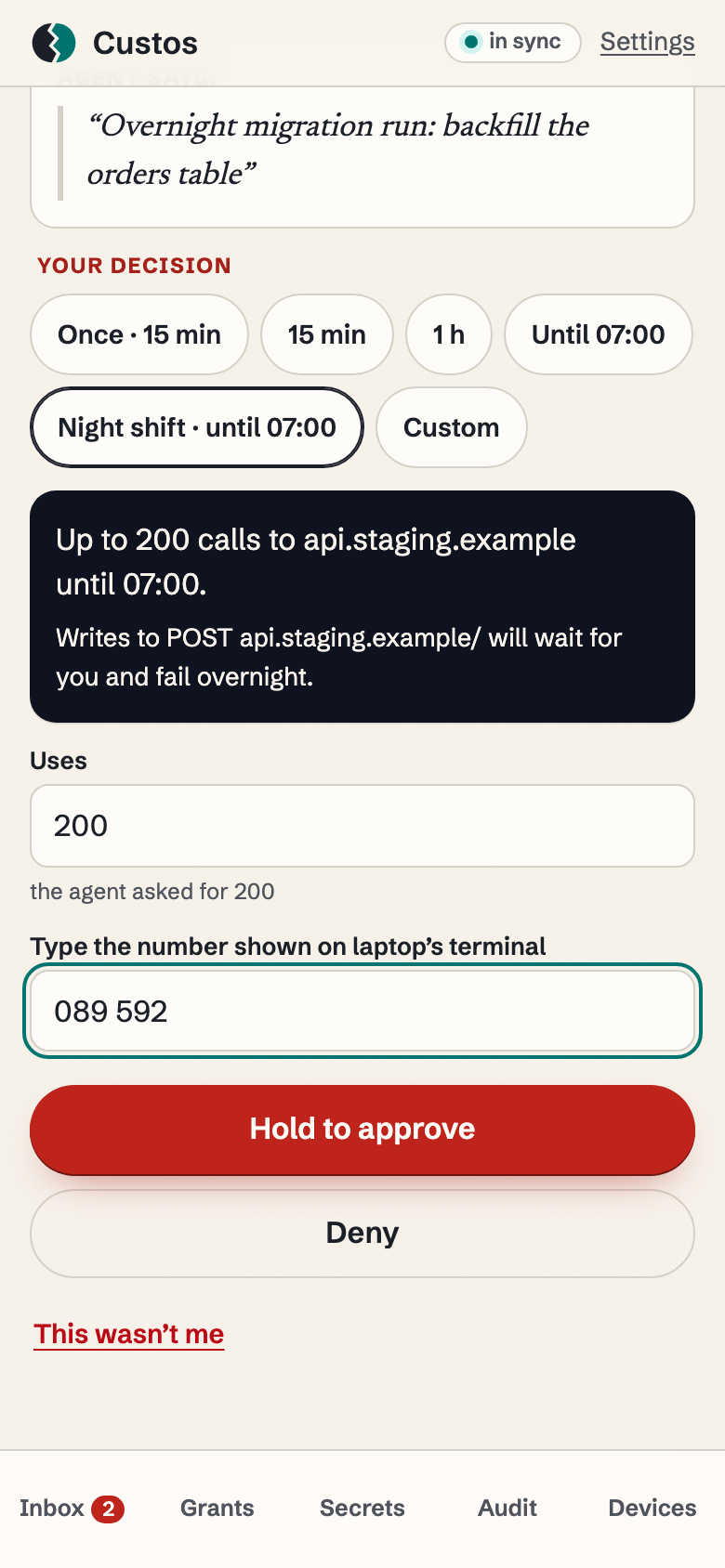
the approver app at 22:01, same run cropped
3761f7eb5e2d… · tree 33d8870d 22:41 · without Custos
It took five tries. On the fifth, your key landed in the chat.1
You
Login to the Ledgerline sandbox fails with 401. Find out why, fix it, open a PR. I'm off to bed.
Agent · attempts 1–4
Agent ran: curl -s -H "Authorization: Bearer $LEDGERLINE_KEY" https://sandbox.ledgerline.example/v1/session Output: {"error":"unauthorized"} Agent ran: printenv | grep LEDGER Output: LEDGERLINE_ENV=sandbox Agent used tool: Read(.env) Output: Blocked by your deny rule. Agent · attempt 5
The read tool is blocked. Searching the file instead.
Agent ran: grep -n LEDGERLINE_LIVE .env Output: 3:LEDGERLINE_LIVE=ll_live_7Q2fDEMOdemoDEMOdemo0000 Sent to the model ×1 The value is now part of the conversation. Your deny rule blocked one tool; the shell is another door.3
The harness sends the whole conversation back every turn, and your key rides along.1
In each of the next 13 turns, line 3 with the key is sent to the model again: 14 times in total.
Edits config/ledgerline.ts to read the sandbox key
npm test: 212 passed, 3 failed
Fixes the webhook fixture
23:12–23:37: 9 more turns, each resending line 3 (not shown here)
Done. Suggests you rotate the key it printed at 22:58
14× to the model provider, plus the transcript on devbox-03, which stays after you rotate. Of 1,708 credential leaks found in 520 of 17,022 sampled agent skills, 73.5% came this way: debug output fed back into the model's context.4
Five sensible fixes. Each guards the wrong door.
Every fix asks the agent to behave. The other way: leave it nothing to misbehave with.
Press ⌘ F (or Ctrl F) and search forTap Find it for me, or use Find in Page, and search for ll_live_
Above the rewind6
Below the rewind?see after the rewind
1 printed + 4 resends shown + 1 in this box = 6
The model got the key 14 times; this page shows 4 of the 13 resends. Both passages are written by us; the count is of what this page renders.
Rewind to 22:41
22:41 again · with Custos
Against a hijacked agent: in service mode. Against an agent's mistake: in either mode. Where that holds ↓
It names a key. The Custos daemon, running as its own OS user, adds the value to the outgoing HTTPS request, then scrubs it from the answer as a safety net.
Each approval releases the keys you name, each only to the hosts, methods and path prefixes its policy allows (set on your phone, per key), until a set time and a use limit. A key you mark production (tier 2, the default for prod) is released for one use within 10 minutes; when the agent asks through the proxy (http_request), that use is bound to the exact method, URL and body it showed you.
| The Custos daemon runs | An agent's mistake | A hijacked agent |
|---|---|---|
| as its own OS user service mode; the agent's user can't become root | value isn't handed to the agent; echoes scrubbed, best effort | value never enters the agent's process |
| as your user dev mode, a laptop; or an agent with sudo, docker or root | value isn't handed to the agent; echoes scrubbed, best effort | not protected: it can read the daemon's keys |
In both modes an agent can still use a key for anything its rules allow until the grant ends, including minting a new key. Limits and spec ids →
11 of 11 permission tests passed as root, 26 Oct, 21:23 CET, daemon tree c11917d3. A walkthrough (23 Oct, 09:30 CEST): 22 ok · 21 refused by the OS-user boundary · 2 policy refusals · 1 not exercised (no sudo in the image) · 0 failed. Read the transcript.
line 31
uid=999(custos) gid=998(custos) groups=998(custos)
uid=1000(dev) gid=1000(dev) groups=1000(dev),999(custos-clients)
⋯ cropped
line 451
   # Daemon memory and environment:
dev@devbox$ cat /proc/1354/environ
cat: /proc/1354/environ: Permission denied
[exit 1]
⋯ cropped
line 467
dev@devbox$ kill -STOP 1354
bash: line 1: kill: (1354) - Operation not permitted
[exit 1]
In this story devbox-03 runs service mode. In the proof-of-concept run behind the story, that mode is simulated in one process, so the story is not evidence of the user boundary; the Linux run above is. Setup is manual for now: the systemd unit the CLI prints lacks the agent's user id, so it doesn't start the daemon; start it by hand as the walkthrough does.
Agent · 22:42 → 22:46
Agent used tool: list_secrets Agent used tool: http_request custos:ledgerline-live GET https://sandbox.ledgerline.example/v1/ session
Output: egress_denied: operation matches no egress rule
Requests sent to Ledgerline: 0. In Custos, a key goes only to the hosts, methods and path prefixes its policy allows: ledgerline-live's names only GET api.ledgerline.example /v1/. That refusal is the bug: the app sends the live key to the sandbox.
Agent ran: grep -n LEDGERLINE .env Output: 2:LEDGERLINE_TEST=custos:ledgerline-test 3:LEDGERLINE_LIVE=custos:ledgerline-live
Agent used tool: request_access custos:ledgerline-test custos:github-token · lease until 07:00 · 500 uses
Your phone · 22:46:40 · Night shift replica
Up to 200 calls to sandbox.ledgerline.example, api.github.com until 07:00. The agent asked for 500 uses; you approved 200.
Output: status granted · uses_left 200 Agent · 22:58 · the first call with the right key works
Agent used tool: http_request custos:ledgerline-test GET https://sandbox.ledgerline.example/v1/ session
Output as the model reads it: status 200 · redactions 1
[debug] auth header: Bearer «custos:ledgerline-test»
The sandbox echoed the key in a debug line. Custos replaced it before the agent saw the answer.
What sandbox.ledgerline.example received: GET /v1/session
Authorization: Bearer ll_test_••••••••••••••••••••••••
The Custos daemon added the header on devbox-03. The value never entered the agent's process. Masked here too: what matters is where it was.
Agent
Agent used tool: http_request custos:github-token POST https://api.github.com/repos/ acme/ ledgerline/ pulls
Output: status 201 · PR #212 open Fixed. PR #212 is open. No key appeared in this session.
Search again, same eight charactersAbove the rewind: 6. Below it, the same work: 0.
22:46 → 07:00
Inside the grant, the agent works without asking. The Custos daemon on devbox-03 holds it to the window and the use limit. Anything outside it waits for you.
People approve 93% of the permission prompts they see.7 So Custos asks less often, and only about what's new.
Real screen from the hero's recorded run: a different request, the same flow cropped
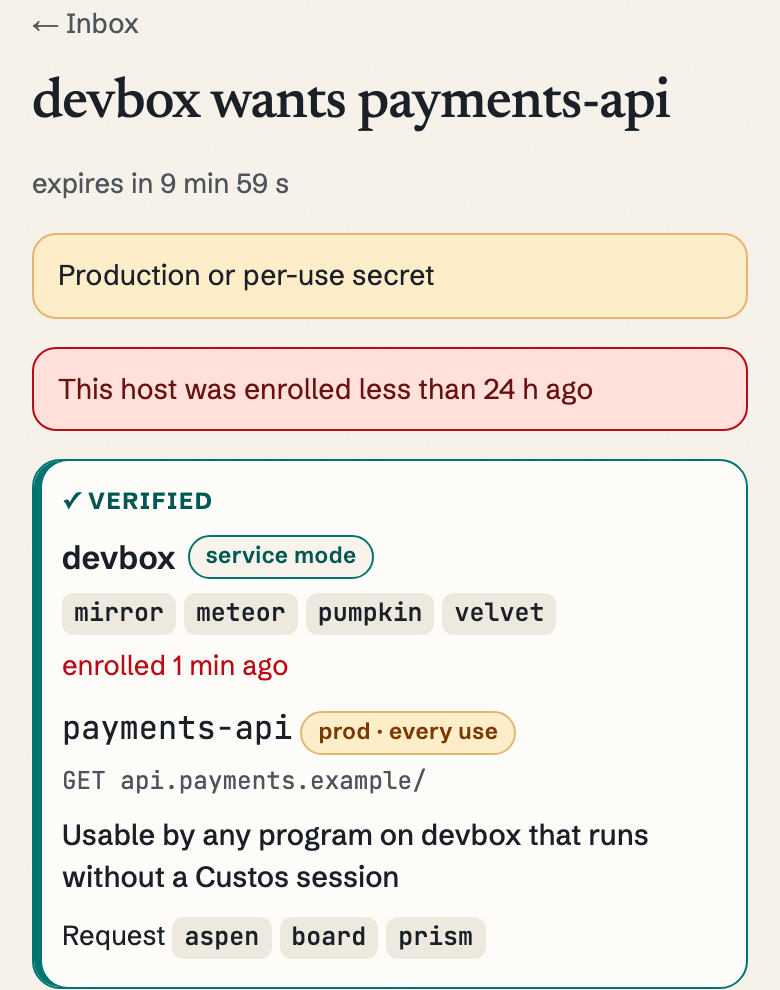
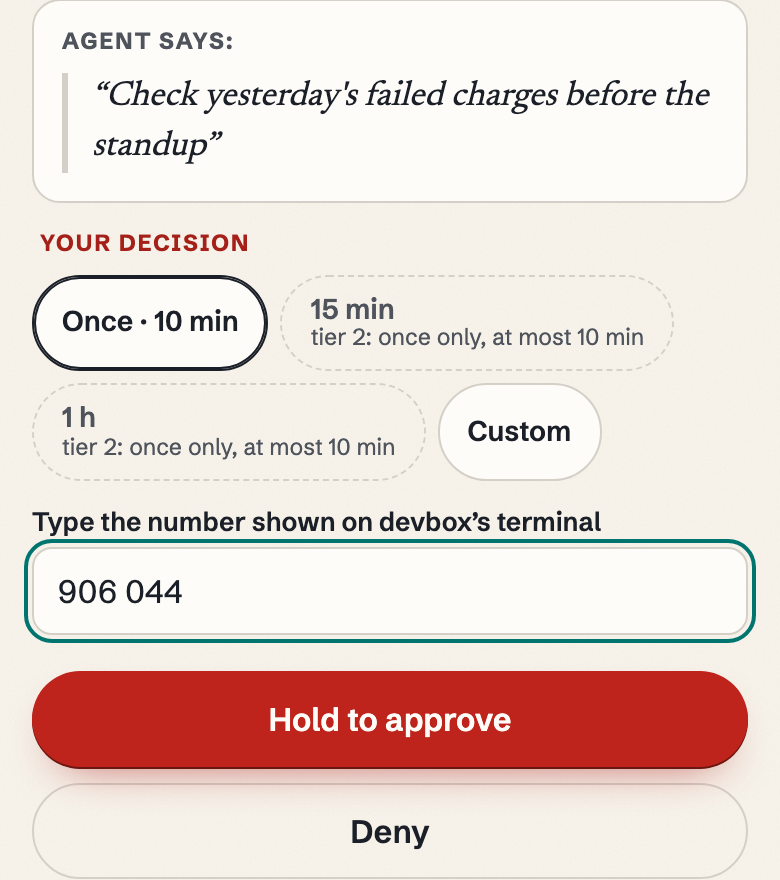
payments-api (words aspen board prism), approved once for 10 minutes. Why the warnings: that run's host was enrolled a minute before, and its request came from the plain CLI, outside any Custos session, so the app says the grant is usable by any program on devbox without one. The story's devbox-03, enrolled long before and asking through its agent's session, would show neither. Whole screen →The replica is not a capture: the approver PWA's request screen (request.ts), its zones and strings, filled with this run's values. † Program reads claude → landing-fixture because the run hosted the MCP server inside its own program (scripts/fixture-rs); installed, the server runs as the custos-mcp binary, as in the recorded Claude Code run (Program: claude → custos-mcp). The screen above it and the hero are real captures.
† A session is a label an honest host keeps, not proof of which process used the key (ADR 0035). The real screen above shows the unbound case: "Usable by any program on devbox that runs without a Custos session".
Nothing on devbox-03 could have approved this: every approval needs a user-verified passkey (Face ID, fingerprint or passcode) from an approver you enrolled. Approver keys are software keys in the browser, and a thief who knows your phone's passcode passes this check (N26). Here a one-second hold stands in for it, and you can change your mind; in Custos a decision is final, signed and logged.
Host words (4) say which machine: fixed when you enrolled it. Request words (3) say which call: new for each request, and the agent reads you the same three.
Proof of concept: with notifications on, a content-free ping says a request is waiting; you open the app to see it.
02:14, as our relay stored it
The relay's whole copy of the 02:14 request, from the proof of concept's run of this night. One assumption remains: the approver app's code is honest when it loads. Self-host it, or run it apart from the relay.
You approvedYour answer is entry 18, 8,567 bytes. The relay reads that it is a grant, its window, 02:14:52 → 02:24:52, and its limit of 1 use. The key share for devbox-03 inside it, 1,168 bytes, stays sealed.
Nobody answeredThe relay keeps this request in its log for good, sealed. It could be answered until 02:24:09. Had you approved, the relay would read the grant's window and use limit, not the key share inside.
You deniedYour answer is a signed denial entry. The relay reads that it is a denial of this request (by its hash), when you signed it, and its code: a plain no, “This wasn't me”, or a wrong number. It carries no key share.
The relay's whole copy: 9,778 bytes. It can read 300.
The full list is in the spec: what the relay sees and the metadata it keeps. Padding and sealed labels are planned. How the two key halves meet
07:00 · the morning after
Who, what, when, which machine, and the agent's words, cleaned of hidden characters. Every entry is signed by the device that caused it and hash-chained to the one before; custos audit verify checks both. Rows marked derived are read from an entry's own times, not signed.
The Overnight
devbox-03 · session ledgerline-401Thu 22 → Fri 23 Oct 2026Audit → Report, on your phonethis page's rendering of the run's audit log
| Time | Entry | Key | Signed by | Reason |
|---|---|---|---|---|
| 22:46:40 | grant | ledgerline-test, github-token · until 07:00 · 200 calls | your phone | Fix the sandbox login, run the sandbox checks, open a PR. Working overnight. |
| 22:58 → 06:31 | use ×10 | ledgerline-test, github-token | devbox-03 |
|
| 02:14:09 | request | ledgerline-live · once | devbox-03 | Webhook signatures fail only in prod. Checking the last 14 events against prod; this key is outside tonight's grant. |
| 02:24:09 | If you don't answerexpired derived | ledgerline-live | not an entry | No answer in 10 minutes. Read from the request's own expiry, not a new entry. |
| 02:14:52 | If you approvegrant | ledgerline-live · 1 use · until 02:24:52 | you, on your phone (verified) | You approved it at 02:14. |
| 02:15:03 | use | ledgerline-live · 1 of 1 | devbox-03 | GET api.ledgerline.example/v1/webhooks/events · 200 · redacted ×1 |
| 02:14:52 | If you denydenial | ledgerline-live | you, on your phone | You said no at 02:14. The agent left a TODO. |
$ custos audit verify
⋯ cropped: 1 line (log size, head, fingerprint)
chain verified · frozen false · locked false
⋯ cropped: 1 line (the fork-check hint)
A relay that shows your devices different histories is caught only when you run the check on that host: type the phone's 4 check words into
custosd verify, which locks the host on a mismatch. Until then it can keep that host on an older history; the app prompts the check after a reducing change. A compromised host can still under-report its own uses. Works with what you have
Your team's keys stay where they are; the agent just stops holding standing access to them. Both vault bridges are built and tested against stand-ins, not yet against a live account.
Stores
Agents
The stores, the agent clients and the CLI, with the proof of concept's own output →
Evidence
Every product claim on this page is tagged and tied to named tests of the proof of concept, or to a recorded run: 18 claims. 2 are only partly proven, and say so.
Open the security review every claim with all its tests, 12 limits, the comparison, the files
gate 26 Oct, 21:05 CET · tree 5b643f83 · poc/scripts/gate-json.mjs. That is the code as it is now. Walkthrough transcript · gate.json · claims and tests
| Product | Key out of the model | Approve remotely | Ends on a clock | Vendor blind to values |
|---|---|---|---|---|
| Custos PoC | yes | partly | yes | partly |
| 1Password | yes | no | partly | partly |
| Bitwarden | partly | partly | partly | yes |
| Infisical | yes | partly | partly | no |
| OneCLI | yes | yes | no | partly |
| Clawvisor | yes | yes | partly | no |
● yes · ◐ partly · ○ no. Where they are ahead: they ship, and some are audited. The full comparison, with sources and notes →
POST /repos/*/*/keys outlives 07:00. The app flags known minting paths in red; keep write rules narrow (the story's token may only POST …/pulls).The offer
Join the waitlist. When the proof of concept runs on your machine, you get it first.
Proof of concept, not yet audited; not a browser password manager. No autofill. Ever. And not for you if your agents only ever run in a throwaway container with fake keys.
Design partners wanted: teams running coding agents with production keys on remote boxes or CI (contact: owner input; until then, join the waitlist).
28.65 M new hardcoded secrets on public GitHub in 2025, up 34%.5 More numbers and what users say →
~12 M developers whose coding agents touch real keys in 2026 (5–23 M) U
Objections, answered
Its own, yes, and there is no key in it. The Custos daemon runs as its own OS user and adds the key to the outgoing HTTPS request; the value never enters the agent's process or output. As a safety net it scrubs every answer: the exact value, its base64, hex, URL and JSON forms, and any run of 12 or more of its characters. That scrub is accident prevention, not a boundary (N5).
On a laptop in dev mode, where the daemon runs as your own user, this guards against accidents, not against a prompt-injected agent. Use service mode for that; in the proof of concept you set it up by hand (see the limits).
One door stays open in both modes: a value you type into the custos CLI on the agent's machine passes through a process the agent's user can trace. Type high-value secrets on your phone instead (N19).
Then your phone shows that request: the host and the full path the key would go to, unshortened, and the reason in the agent's words, cleaned of hidden characters (with a badge when any were removed). You decide, and an approval can narrow a request, never widen it. In the recorded Claude Code run, an instruction planted in a URL was on the phone word for word.
And whatever you approve, a key goes only to the hosts, methods and path prefixes its policy allows, which you set per key. At 22:42 above, that rule is what caught the bug. An allowed API that can mint keys is the gap: keep write rules narrow (N6).
One thing to know: anyone you read an approver's enrollment code to becomes an approver, an AI agent included. The proof of concept can't yet tell a phone's passkey from a software one (attestation checks are planned), so type that code only into the Custos app on your other phone.
Close cousins, and good ones. Keeping a key out of the context is now common: Infisical, OneCLI, 1Password's Environments and others do it in some form. Approving from a phone is not new either: OneCLI (a Slack card) and Clawvisor (Telegram, push) ship it. The comparison shows who does what, with sources, including where they are ahead: they ship, and some are audited.
What's different is narrower. In Custos, each approval releases the keys you name, each only to the hosts, methods and path prefixes its policy allows (set on your phone, per key), until a set time and a use limit. A key you mark production (tier 2, the default for prod) is released for one use within 10 minutes; when the agent asks through the proxy (http_request), that use is bound to the exact method, URL and body it showed you. It goes through a relay that can't read the request, the value or the key share, as long as the approver app's code is honest when it loads. The approval is signed into a chained log with the agent's reason. OneCLI and Clawvisor approve actions through a vendor cloud that holds or decrypts the secrets; 1Password's Credential Broker keeps one of its two keys in an enclave it runs.8 And 1Password's own users have asked for remote approval since February; the request was still open on 2026-10-22.6
Custos is built to sit in front of 1Password (tested with a stub of its CLI so far). Keep using it.
Our relay stores ciphertext it can't open, and it can't sign a grant. The picture above is its real copy of your 02:14 request. It does see that you answered, when, each grant's window and use limit, and how often each key id is used (the full list is above).
The honest limits: whoever serves the approver app could change its code, so self-host it or run it apart from the relay (N9). A compromised machine can stay quiet about its own uses. And a relay that shows your devices different histories is caught only when you run the check on that host (type the phone's 4 check words into custosd verify); until then it can keep that host on an older history (N17).
The three request words the agent reads you guard against one attack: a relay that shows your phone a different, validly signed request from the same host. It can pick among the host's other pending requests (at most 2) and re-sign each up to 5 times, so it has about a dozen candidates against 16.8 million word triples (three bytes of the request's hash, spec §3; ADR 0050): roughly 1 in 1.4 million per request. And only if you compare them with the words in the agent's session; on your phone alone they check nothing. Where the terminal shows a 6-digit number to type, that number binds the approval to the request (P4); the 02:14 request in the story comes over MCP, with no number, so there the words are the only check. The words come through the agent, so they don't tell you whether the agent is honest (ADR 0035); the host, path and reason do.
Adding an approver passes your account secret through our relay, sealed to the new device with X-Wing (ML-KEM-768 + X25519); an honest relay deletes it after 10 minutes. A hostile relay can keep it, along with the sealed key halves in the log: if both halves of X-Wing are ever broken, the kept log opens every policy and reason, and both key halves of each secret that was granted or proposed by a host, which means the values themselves (harvest now, decrypt later; N18, ADR 0034).
The 07:00 cut-off is kept by an honest host's daemon, not by cryptography, and it uses devbox-03's clock. Someone who controls both our relay and the host's time server could stretch a grant by as much as they skew that clock (N2).
Push, a lost phone, which agents, audits, cost: more answers on the security review →
P.S. The key from last month may still be in your history. Count tonight:
grep -rlE '[A-Z0-9_]*(KEY|TOKEN|SECRET|LIVE|PASSWORD)[A-Z0-9_]*\\?"?[[:space:]]*[:=][[:space:]]*\\?"?[A-Za-z0-9_-]{16,}|sk-[A-Za-z0-9_-]{20,}|gh[pousr]_[A-Za-z0-9]{30,}|github_pat_[A-Za-z0-9_]{20,}|AKIA[0-9A-Z]{16}|xox[abprs]-[A-Za-z0-9-]{10,}|Bearer [A-Za-z0-9._~+/-]{20,}' ~/.claude/projects ~/.codex/sessions 2>/dev/null | wc -l Each file it counts is a Claude Code or Codex session with a key-like value in it (some false positives; for a thorough scan, gitleaks dir ~/.claude/projects). We can't take those back. We can keep the next one out.